

FAQ4:How to insert a SIM card in MCR30?
read0order date2024-10-31 14:52:17
The SIM card needs to support 2G communication services.
1.As shown in figure1, turn the MCR30 cash register face down, open the battery compartment cover on the back, remove the lithium battery (if present), and insert the SIM card into the leftmost card slot in the battery compartment in following direction which is marked in red arrow.
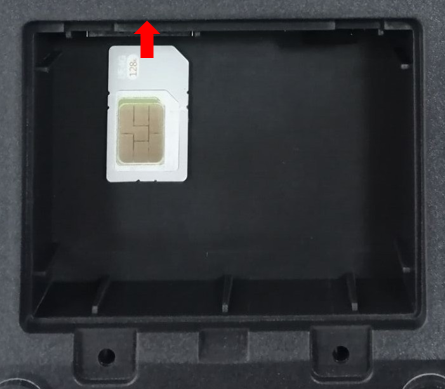
Figure 1
2.As shown in figure 2, slowly push the SIM card to the bottom of the card slot and you will hear a very light spring sound. The SIM card will rebound about 1mm after releasing the SIM card, indicating that the SIM card has been inserted.
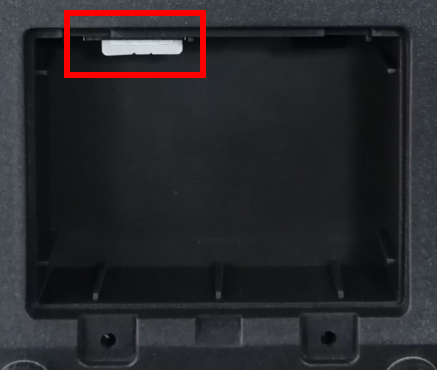
Figure 2
3.When you want to remove or replace the SIM card, you need to push the SIM card in and release you finger to let the card pop out automatically.
previous postsFAQ3:How to connect external printer to ECR?
next chapterFAQ5:How to read debugging information of ECR via serial port?