

FAQ3:How to connect external printer to ECR?
read0order date2024-10-31 14:39:20
Connect the printer with RS232-I/RS232-II (COM1/COM2) directly. (RS232-II for example)
Press 4 then KEY to enter to the SET mode, select the six menu (6. PERIPHERALS ) by pressing ↑ and ↓ keys.

Press ENTER and you can see the fifth menu 5. EXTERNAL PRINTER.

Select the type of printer (T58A-C,T80A-C,T58B-C,D76A-C,CITIZEN and T58A), serial port number(PORT#2 usually), protocol (need to be same as the printer,9600 usually) by SELECT key.
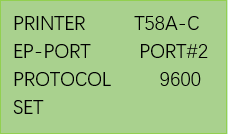
Press EXIT key to exit and save above setting.
previous postsFAQ2:How to connect scale to ECR?
next chapterFAQ4:How to insert a SIM card in MCR30?