
FAQ2:How to connect scale to ECR?
read0order date2024-10-31 14:21:13
Our ECR currently supports 6 types of electronic scales: TOLEDO, DIBAL, PS1X, ACS, MINI-L and CAS. If you need other types of electronic scale connections, please contact us!
Here we take DIBAL scale as an example to explain the steps of connecting scale.
Step1: Define WEIGHT key
Unlike printers and scanners, we need to define the weighing key on the keyboard first before using the scale. Its process should be:
Press 4 then KEY to enter to the SET mode, select the third menu (3. KEYBOARD ) by pressing ↑ and ↓ keys.
Press ENTER, select the first menu (1.DEF KEYBOARD) by pressing ↑ and ↓ keys.
Press ENTER, select the fifth menu (5.WEIGHT) by pressing ↑ and ↓ keys.
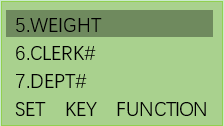
Press ENTER, it will show:
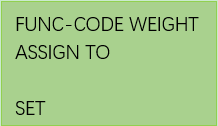
Press a key on the keyboard where you want to define this feature. For example press COUPON key, the coupon key will be changed to weight key.
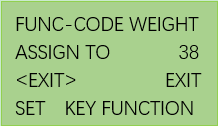
Press EXIT to exit above setting page.
Step2: Connect scale with RS232-I/RS232-II. The process should be:
Press 4 then KEY. The sixth menu is PERIPHERALS.
Press ENTER and you can see the second menu SCALE.
Need to select the serial port number, protocol, scale type by SELECT key.
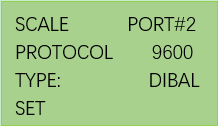
In REG mode, you need to press the weight key (COUPON key in this example) to read the data on the scale.
previous postsFAQ1:How to connect and use scanner?
next chapterFAQ3:How to connect external printer to ECR?